Alex Chalkias
on 3 April 2020
The stable release of LXD, the machine container hypervisor, is now available. LXD 4.0 is the third LTS release for LXD and will be supported for 5 years, until June 2025. This version comes with a significant amount of new features including adding virtual machines (VMs) support, the introduction of projects and improved networking, storage and security capabilities.
What’s new in LXD 4.0 LTS?
LXD can now run both containers and virtual machines. VM images are now available for the most commonly used Linux distributions and more will be added in the future. The latest addition to the VM support feature set is the backup via import/export commands. LXD aims to provide a similar user experience regardless if a user wants to spin up a container or a virtual machine.
Another significant improvement from LXD 3.0 is the concept of projects that help users better organize their containers and VMs. Projects help group relevant instances, images, profiles and storage volumes by segmenting the LXD server. Project-based restrictions, access control and resource quota configuration are also available.
On the networking side, LXD 4.0 brings API modifications that enable network status reporting to provide better network monitoring capabilities. DHCP leases, support for nftables, NAT source address and MAC address configuration are also new features of LXD, that enhance network configuration capabilities for containers and VMs. The latest version increment that is included in LXD 4.0 LTS adds container support for ipvlan and routed NIC types for IPv4 and IPv6.
Furthermore, LXD’s storage layer has been modified entirely from the previous LTS release to improve latency and flexibility. As a result, it is very easy to add support for new storage backends in LXD. Cephfs is the latest addition, enabling the last missing storage interface of the highly-popular software defined storage solution. As of LXD 4.0 LTS, you can also separate metadata and data pools using Ceph as a LXD backend.
LXD 4.0 LTS comes with security enhancements, such as support for role-based access control that is made available through the use of Canonical RBAC and cgroup v2 support, to securely distribute system resources to processes.
Finally, a lot of improvements were made on the snapshot management side, notably the ability to copy or move container instances between storage pools and the exposure of every individual snapshot size through the API. You can find the full list of changes on the LXD blog.
Why LXD?
If you have yet to familiarise yourself with LXD and machine containers, you should know that they provide a fully-functional OS that is running on the filesystem. They bring the same performance and latency as application containers, but with increased security and have optimised resource consumption and better latency than virtual machines. LXD’s main goal is to streamline lift and shift for traditional, monolithic applications running on virtual machines or bare metal and enable microservice application development. It can run several thousand containers and virtual machines on a single machine, offers a REST API and can easily be clustered for large scale deployments.
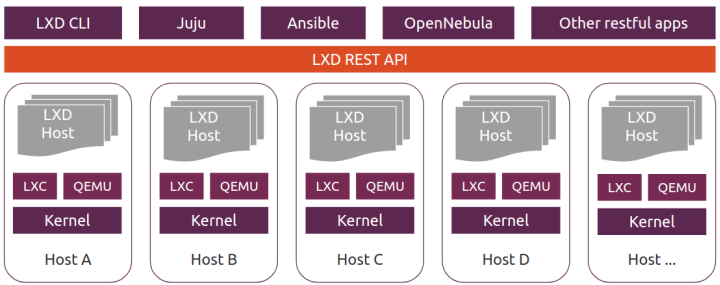
You can try LXD on any Ubuntu machine as it comes pre-installed with all Ubuntu LTS releases. Follow the get started guide for all major Linux distributions, Windows and MacOS or try it online.
Learn more on the LXD website.